TCS (TAX COLLECTED AT SOURCES)
It is collected by seller of certain specified goods of
certain specified rate at the time of purchase and remit in the treasury bank
on the behalf of buyer.
Under TCS, some special category is defined and TCS rate for
each nature is different.
Working steps:-
Create a company and then activate VAT as follow:
To Activate
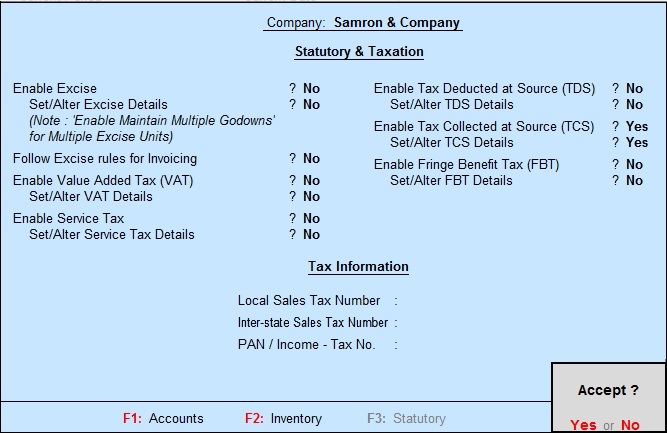
TCS: - G.O.T. (Gateway of Tally)--> Press F11
(Company Features)--> Press F3
(Statutory & Taxation).


And then create ledger:
Path for
ledger creation: - G.O.T. (Gateway of Tally)--> Accounts Info--> Ledger--> Create (Single).


Create stock master as follow:-
To create
stock group: - G.O.T. (Gateway of Tally)--> Inventory Info--> Stock Group--> Create (Single).

To create
stock item: - G.O.T. (Gateway of Tally)--> Inventory
Info--> Stock Item--> Create (Single).

And then do voucher entry as follow:-
Path for
voucher creation: - G.O.T. (Gateway of Tally)--> Inventory Voucher--> Press F8 (Sales Voucher)--> Press F12 (Configuration).


Now you can see the TCS report as follow:
Path for
view TCS report: - G.O.T. (Gateway of Tally)--> Display--> Statement of Accounts--> TCS Outstandings--> TCS Payable.

Now again do voucher entry:-
Path for
voucher creation: - G.O.T. (Gateway of Tally)--> Inventory Voucher--> Press F5 (Payment Voucher)--> Press F12 (Configuration).


See the TCS report as follow:
Path for
view TCS report: - G.O.T. (Gateway of Tally)--> Display--> Statement of Accounts--> TCS Outstandings--> TCS Payable.

You can see that the report is blank, it means that the TCS
has been paid.


