PAYROLL
Payroll is the process of maintaining records of all employee
salary under various pay head, all statutory and non- statutory deduction
attendance/ absent record.
Working steps:-
Create a company and then activate payroll as follow:
To Activate
Payroll: - G.O.T. (Gateway of Tally)--> Press F11 (Company Features)--> Press F1 (Accounting
Features).

Create attendance/ production types as follow:-
Path for attendance/
production types creation: - G.O.T. (Gateway of Tally)--> Payroll Info--> Attendance/ Production Types --> Create.


Here, press “Alt + C” to create unit as follow:-

And then accept the attendance type:-

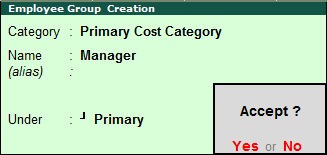
After that create employee group:-
Path for employee
group creation: - G.O.T. (Gateway of Tally)--> Payroll Info--> Employee Group --> Create (Single).

And then create employee:-
Path for
employee creation: - G.O.T. (Gateway of Tally)--> Payroll Info--> Employees--> Create (Single).


Create pay head:-
Path for pay
head creation: - G.O.T. (Gateway of Tally)--> Payroll Info--> Pay Heads --> Create.


Create salary detail of Ram and Shyam:-
Path for salary
detail creation of Ram: - G.O.T. (Gateway of Tally)--> Payroll Info--> Salary Detail --> Create--> Ram.

Path for salary
detail creation of Shyam: - G.O.T. (Gateway of Tally)--> Payroll Info--> Salary Detail --> Create--> Shyam.

Now do voucher entry as follow:-
Path for voucher
creation: - G.O.T. (Gateway of Tally)--> Payroll
Voucher--> Press Ctrl
+ F5.

Now press “Ctrl + F4” to open payroll voucher:-
Press “Alt + A” to auto fill information.


Now you can see the payroll report as follow:-
Path for
view report of payroll: - G.O.T. (Gateway of Tally)--> Display--> Payroll Report--> Statement of Payroll--> Pay Slip--> Ram/ Shyam.


