VAT RETURN OR VAT USED IN CREDIT/ DEBIT NOTE OR VAT IN GOODS RETURN
It is used for purchase and sales
return under VAT. We can also adjust VAT return with purchase and sales
transaction.
Working steps:-
Create a company and then activate VAT:
To Activate
VAT: - G.O.T. (Gateway of Tally)--> Press F11
(Company Features)--> Press F3
(Statutory & Taxation).

And then create ledger:
Path for
ledger creation: - G.O.T. (Gateway of Tally)--> Accounts Info--> Ledger--> Create (Single).


After that, create stock master as
follow:
To create
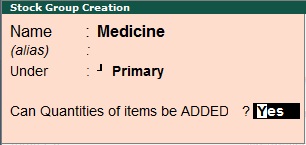
stock group: - G.O.T. (Gateway of Tally)à Inventory Infoà Stock Groupà Create (Single).
To create
stock item: - G.O.T. (Gateway of Tally)--> Inventory
Info--> Stock Item--> Create (Single).

And then do voucher entry as follow:-
Path for voucher
creation: - G.O.T. (Gateway of Tally)--> Inventory
Voucher--> Press F9
(Purchase Voucher).

Now activate debit and credit note:
To Activate
Debit and Credit Note: - G.O.T. (Gateway of Tally)--> Press F11 (Company Features)--> Press F1 (Accounting Features).

Again do voucher entry as follow:-

Now you can see the VAT report.
Path for
view VAT report: - G.O.T. (Gateway of Tally)--> Display--> Statutory Report--> VAT Report--> VAT Computation.

Press “Alt + F1” for more details.


