VAT IN ACCOUNTING VOUCHER
VAT is
maintained in both Accounting and Inventory mode. If you want to maintain VAT
in Accounting Voucher then follow the steps given below.
To maintain:-
Create a company and then activate VAT as follow:-
To Activate
VAT: - G.O.T. (Gateway of Tally)--> Press F11
(Company Features)--> Press F3
(Statutory & Taxation).

After that press “enter”.

Again press “enter” many times.

Accept it by pressing “y” or “enter” key.
Create ledger as follow:-
Path for
ledger creation: - G.O.T. (Gateway of Tally)--> Accounts Info--> Ledger--> Create (Single).


Now do voucher entry as follow:-
Path for
voucher creation: - G.O.T. (Gateway of Tally)--> Accounting Voucher--> Press F9 (Purchase Voucher).


Press F8 to open Sales Voucher.
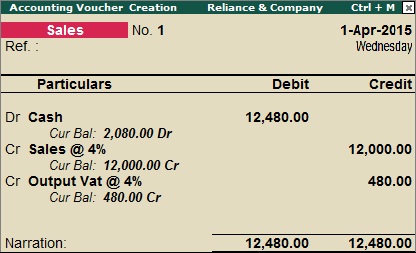
Now you can see VAT computation follow:-
Path for
view VAT Computation: - G.O.T. (Gateway of Tally)--> Display--> Statutory Report--> VAT Report--> VAT Computation.


For more information, press “Alt + F1”.


